
You have a checkout page open, your card in your hand, and a feeling you cannot quite place. The site looks fine. The prices are good. Something is off.
Here is the fastest way to resolve that in about a minute.
The 60-second check
- Look up when the domain was registered. A store selling branded goods on a domain created a few weeks ago is the strongest single signal in this article.
- Copy a sentence from the returns policy and paste it into a search engine, inside quotation marks. If that exact paragraph appears on nine other stores with nine different names, you have found a template operation.
- Reverse image search one product photo. Photography lifted from the real manufacturer or from a different retailer takes seconds to expose.
Everything else below is supporting evidence. That matters more than it sounds, because most advice on this subject presents ten or thirteen signs as though they carry equal weight, and they do not. A domain registered eleven days ago is close to conclusive. A spelling mistake is almost meaningless.
This is not a small problem. The Anti-Phishing Working Group recorded over a million phishing attacks in a single quarter, specifically 1,069,681 in the second quarter of 2026, up 10.1 percent on the quarter before.
Why the padlock tells you almost nothing
Before the list, the belief that gets more people robbed than any other.
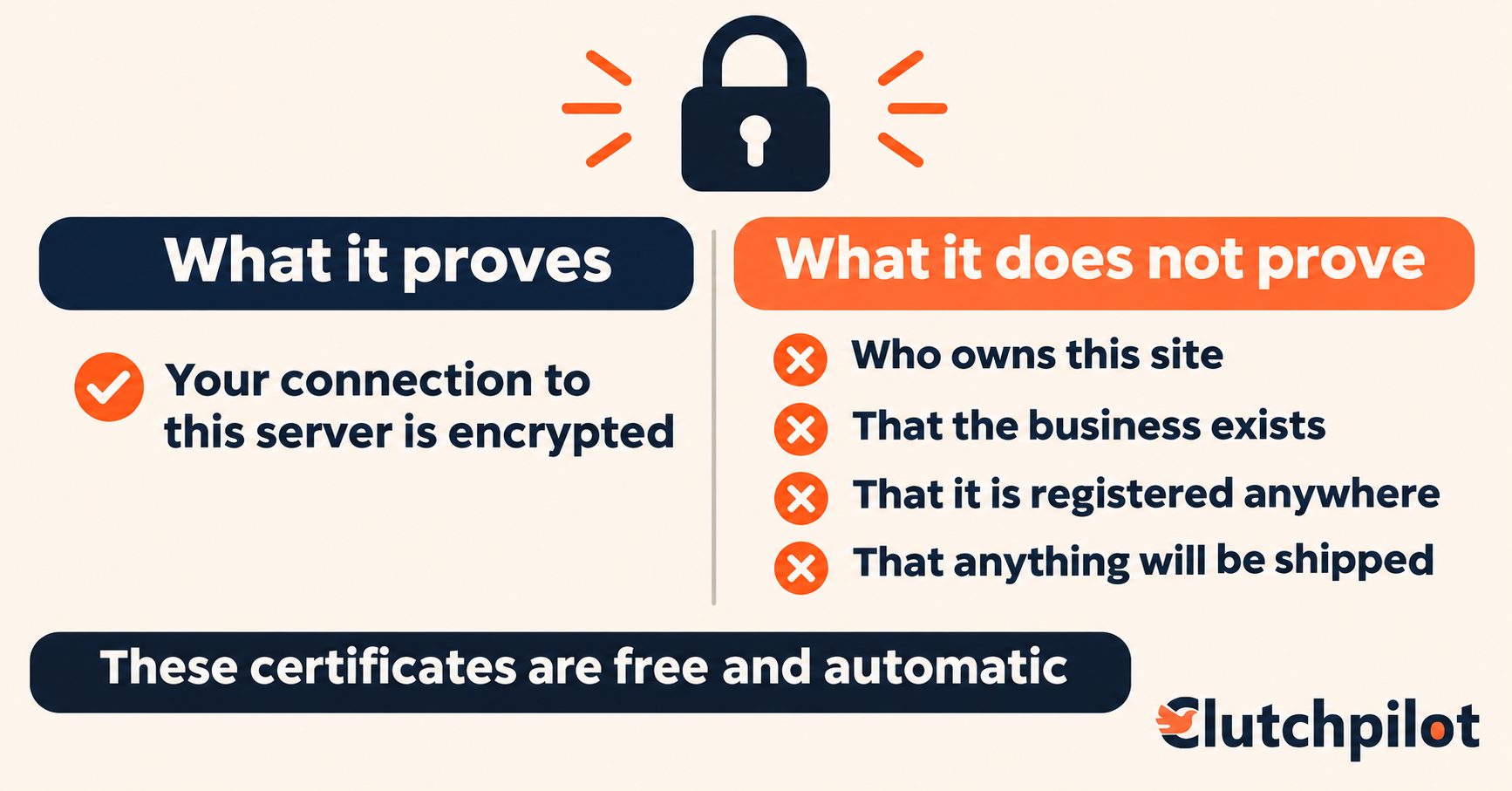
The padlock in your browser bar does not mean a site is trustworthy. It never did.
What the certificate behind it actually proves is that whoever requested it controls that domain. That is all. It does not verify who they are, whether the business exists, whether it is registered anywhere, or whether it intends to send you anything. Domain-validated certificates are free, issued automatically, and take a few minutes to obtain.
The numbers followed. Back when the Anti-Phishing Working Group still tracked this, in the first quarter of 2021, about 83 percent of phishing sites were already using HTTPS. That figure is from early 2021 and APWG no longer publishes the metric, so treat it as historical. The direction of travel since has been one way, because free automated certificates became the default for everybody, honest and otherwise.
What the padlock does mean, and it is worth having: your connection to that server is encrypted, so somebody sharing your coffee shop wifi cannot read your card number as it travels. That is a real protection against a real attack. It says nothing whatsoever about who is at the other end of the connection.
Two things are true at once here, and most articles only manage the first:
- A missing padlock in 2026 is a genuine warning sign, because nearly every site has one now, so its absence is unusual.
- A present padlock is not evidence of anything at all.
Two related tricks worth knowing. Scammers put reassuring words inside the domain itself, so https-paypal-secure.com has nothing to do with PayPal and the word "https" there is just text. And browser warnings are subtler than they used to be, so a missing certificate now usually shows as a quiet "Not secure" label rather than a full-page alert. It is easy to miss if you are not looking.
How to read the next ten signs
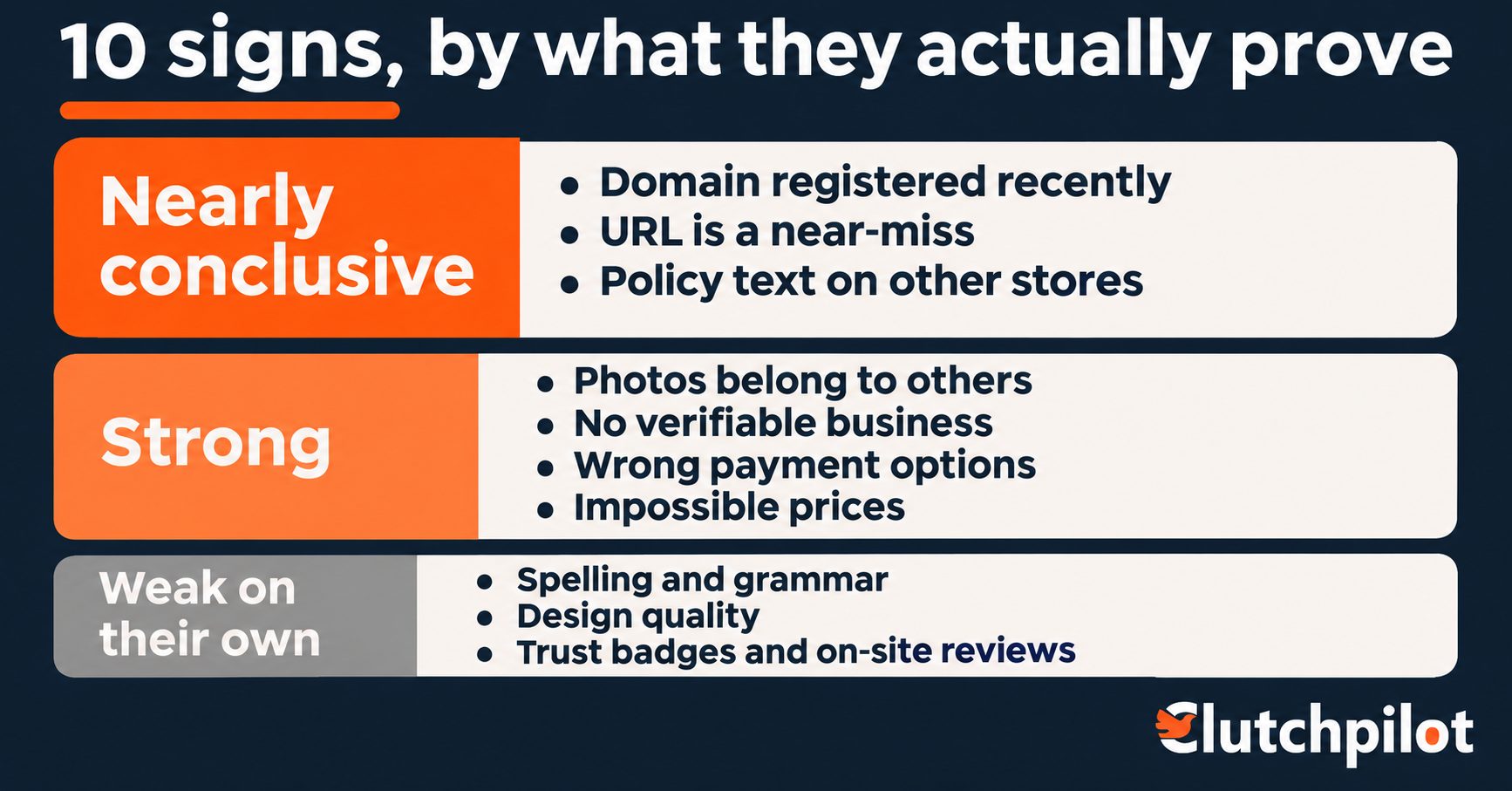
Three tiers, by how much each one actually proves.
Nearly conclusive. One of these alone justifies closing the tab.
Strong. Any two together should stop you.
Weak on their own. Useful as corroboration, misleading in isolation.
The tiers matter because the two failure modes are symmetrical. A reader who treats bad grammar as proof will eventually be robbed by a polished site. A reader who dismisses a two-week-old domain because the design looks professional will be robbed too.
Tier one: nearly conclusive
Sign 1. The domain was registered recently
How to check: run the domain through a WHOIS or RDAP lookup. You get back the creation date, the registrar, and the registrant's country.
What the answer means. Scam stores are disposable by design. They are built to run for a few weeks, take as many card payments as possible, and disappear before the chargebacks and complaints catch up. So the registration date is the closest thing to a scam store's expiry label.
A storefront selling branded goods at a deep discount on a domain created six weeks ago is the strongest signal in this article.
The honest exception, which matters. New legitimate businesses exist, and they all start with a new domain. A recently registered site belonging to a small independent brand with a findable identity, a real address and sensible pricing is not condemned by its age. The combination that should stop you is a new domain plus heavy discounts on established brands.
One thing not to misread. Privacy-protected registrations, where the registrant's name and address are withheld, are extremely common and entirely legitimate. Most registrars enable it by default. Hidden owner details are not a red flag. The creation date is visible either way, and the date is the part that does the work.
Sign 2. The URL is a near-miss of a real one
The patterns, and they recur constantly:
- An extra word bolted on:
nike-outlet-store.com - A character swapped, added or dropped:
arnazon.com,wallmart.com - A real brand on the wrong top-level domain
- A hyphenated version of a name that is not hyphenated
- The real brand placed as a subdomain in front of a fake domain:
apple.com.secure-billing.net
The reading rule that actually works. Read the address backwards from the first single slash. The two parts immediately before that slash are the real domain. Everything to the left of them is decoration that anyone who owns the domain can set to whatever they like.
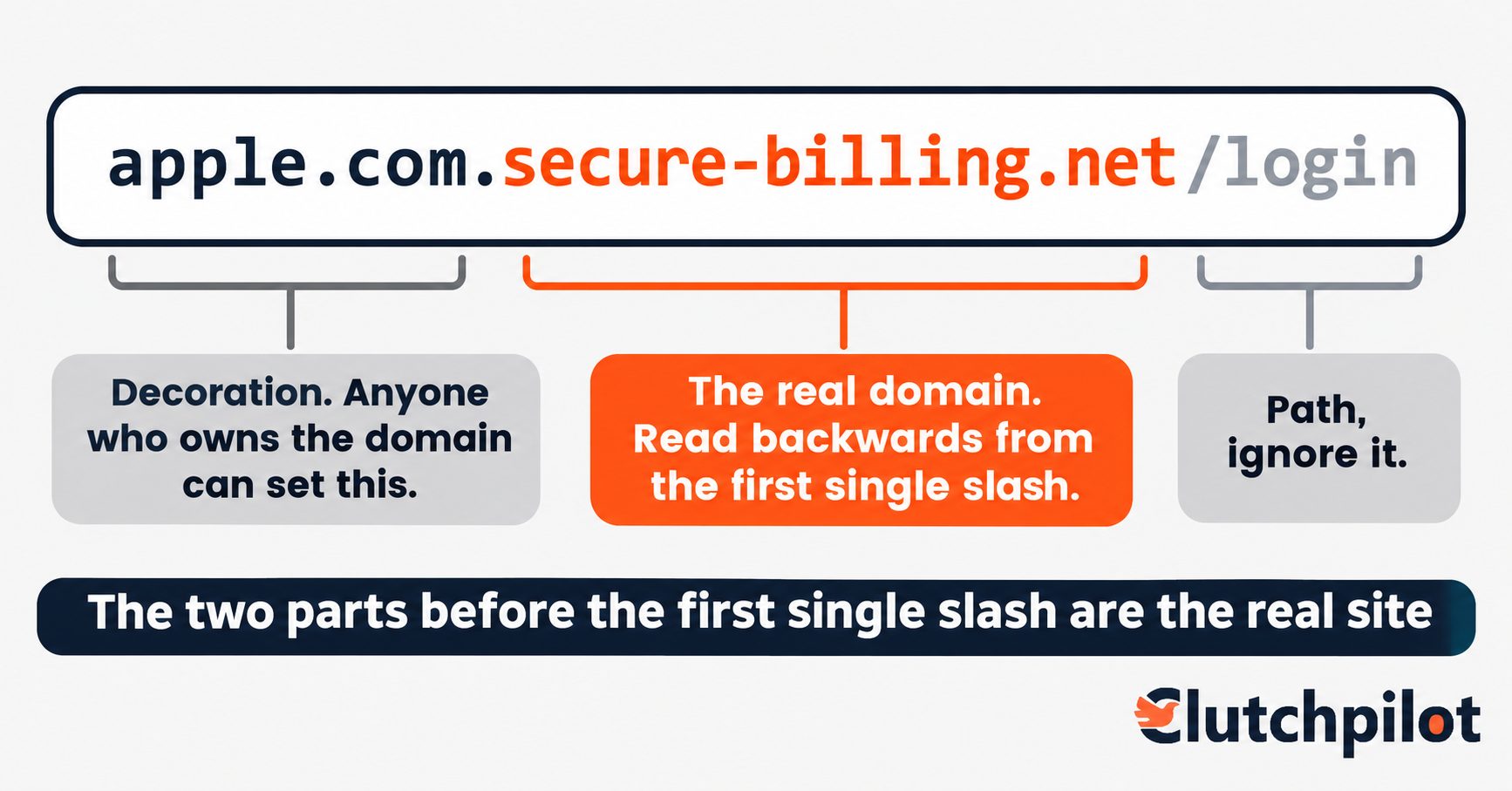
Applied to that last example: the real domain is secure-billing.net. The apple.com at the front is just a subdomain somebody chose, exactly as you might choose blog.
Character-substitution tricks using letters from other alphabets also exist, and most modern browsers now defend against the worst of them by displaying suspicious internationalised domains in their raw punycode form, which looks like gibberish beginning xn--. If you ever see that in an address bar, stop.
Sign 3. The policy text appears on other stores
The fastest check in this article, and I have not seen another guide mention it.
Copy a complete sentence from the returns policy, the shipping policy, or the About page. Paste it into a search engine inside quotation marks, which forces an exact-phrase search.
Template scam stores are generated in bulk from the same boilerplate. The same paragraph, comma for comma, gets deployed across dozens of unrelated storefronts. When that search returns the identical sentence on nine other sites selling nine different things under nine different brand names, you are not looking at a shop. You are looking at one of many outputs from a single operation.
The variant worth trying too. Search a distinctive phrase from the About page, the founder story in particular. The same invented history, often with the same imaginary founder and the same year, turns up verbatim across the whole network.
This check works because writing original legal copy costs money and scam stores are built to be cheap. Legitimate retailers sometimes use templated policy text as well, so the signal is not the template itself. It is finding the same text across unrelated brands.
Tier two: strong signals
Sign 4. The product photos belong to somebody else
Right-click a product image, reverse image search it, and look at where else it appears.
What surfaces: manufacturer photography lifted without permission, images taken straight from a legitimate competitor's catalogue, and stock photos presented as real inventory sitting in a real warehouse.
The nuance to keep hold of. Legitimate resellers very often use manufacturer-supplied images, and that is normal and expected. A match to the brand's own official photography proves nothing on its own.
What matters is a match to a different retailer's photography, or finding that an image's oldest appearance online is on a site in a completely unrelated sector. A "handmade ceramic" whose photo first appeared in a 2019 stock library is not handmade by the person selling it.
Sign 5. There is no verifiable business behind it
Work through the contact details rather than glancing at them.
A contact page with only a web form and no other method. No phone number, or one that rings out indefinitely. No physical address, or an address that satellite view reveals as a residential garage, a mailbox service, or an empty lot. A company name that appears in no business registry anywhere.
Our guide to confirming a business is real covers the registry searches properly, and it applies to an online store exactly as it does to a contractor standing on your drive.
One practical note: a missing phone number is common on small legitimate e-commerce sites, which run on email deliberately. Combined with no address and no registry record, it becomes meaningful.
Sign 6. The payment options are the wrong ones
What should concern you: bank transfer or wire, cryptocurrency, gift cards, or a peer-to-peer payment app offered as the only way to pay. Every one of those is chosen for the same reason, which is that the money cannot be pulled back.
What is normal: major cards and the mainstream digital wallets.
A site that accepts cards everywhere except at the final step, where it suddenly asks for a transfer instead, has told you what it is.
Pay by credit card where you can. The specific differences between card, debit card and wallet protections deserve their own treatment and we will cover that separately.
Sign 7. The prices are not possible
Not "the prices are low." Low prices are the entire basis of legitimate retail competition.
The signal is branded goods at 70 or 80 percent below retail, consistently, across an entire catalogue. One aggressive deal is marketing. A whole store priced below wholesale is not a store.
The question to ask yourself: who is absorbing that loss? On a real clearance there is an answer. A retailer is shifting old stock, a brand is exiting a line, an outlet is selling returns. On these sites there is no answer, because the loss is not being absorbed by anybody. Nothing is being shipped.
Tier three: weak on their own
These are the signs most articles lead with. They are the least reliable ones, and knowing that is part of using them well.
Sign 8. Spelling and grammar
Weak in both directions, which is what makes it genuinely misleading.
Plenty of honest small retailers have typos. So do plenty of excellent sellers whose first language is not English, and treating that as evidence of fraud is both wrong and unfair. Meanwhile professional fraud operations run to thousands of sites and can afford a copy editor.
What still carries some weight: errors in the checkout flow and the legal pages specifically. Those are the pages a real business gets right, because they are templated by the platform or written once by someone careful. Garbled text at the point of payment is worth more than a typo on a product description.
Sign 9. Design and site quality
Also weak now, and this is a change from a decade ago.
Scam stores are built on the same platforms and bought themes as real ones. They look completely normal, because looking normal is cheap.
What still signals something: internal links that go nowhere, placeholder text left in from the theme, a currency or language that does not match the claimed location, and a product range that makes no commercial sense, such as power tools beside skincare beside phone cases. That last one is the signature of a generated catalogue rather than a buyer with a specialism.
Sign 10. Trust badges and reviews on the site itself
The sign most likely to mislead you, because every element of it was put there specifically to reassure you.
Trust badges are images. Anybody can save a security seal, an award logo or an industry-body crest and paste it into a footer. There is no verification step.
Reviews displayed on the site are controlled by the site owner. A wall of five-star reviews with no dates, no specifics, no mention of anything going slightly wrong, and no one-star reviews at all is not social proof. It is page furniture.
The rule: a trust signal only counts if you can verify it somewhere other than the site making the claim.
Checking reviews the right way
Search for the brand name alongside "scam" and alongside "reviews", and read what comes back from elsewhere rather than what is displayed on the site.
Then look at the shape of the reviews rather than the average score:
Dates and volume together. A store whose domain is three weeks old with four hundred reviews has an arithmetic problem nobody can explain innocently.
Whether complaints describe the same failure. Ordinary businesses have scattered complaints about scattered things. Scam stores generate the same complaint repeatedly, usually "never arrived" or "cannot contact anyone".
Whether the positive reviews say anything. Real reviews mention specifics, including small irritations. Generated ones are short, enthusiastic and interchangeable.
It is also worth running the address through Google's Safe Browsing site status check, which tells you whether Google has flagged the site as unsafe. A clean result is not a clearance, since brand new scam sites have not been reported yet, but a flagged result ends the conversation.
The ten signs at a glance
| Sign | How to check | Weight |
|---|---|---|
| Domain registered recently | WHOIS or RDAP lookup | Nearly conclusive |
| URL is a near-miss | Read the domain backwards | Nearly conclusive |
| Policy text on other stores | Exact-phrase search in quotes | Nearly conclusive |
| Photos belong to others | Reverse image search | Strong |
| No verifiable business | Registry, phone, address | Strong |
| Wrong payment options | Look at checkout methods | Strong |
| Impossible prices | Compare to retail across the catalogue | Strong |
| Spelling and grammar | Check legal and checkout pages | Weak alone |
| Design and site quality | Dead links, placeholder text, odd catalogue | Weak alone |
| Trust badges and on-site reviews | Verify off the site, or disregard | Weak alone |
If you already entered your card details
Speed matters more than anything else here. The window in which your card issuer can help is widest in the first few hours.
Call your card issuer now and use the word fraud. Not "I think I might have." Fraud. It routes you to the right team and starts the right process.
Freeze or replace the card. Most banking apps will do this in two taps, and you can usually get a replacement moving in the same session.
Change the password, and change it everywhere you reused it. If the password you typed on that checkout page is the one guarding your email, that is now the urgent problem, because email is how every other account gets reset.
Watch for small test transactions. Stolen card details are often validated with a tiny charge, sometimes under a dollar, before anything large is attempted. A trivial unexplained payment is a warning, not a rounding error.
Report it, both to your card issuer and to the authorities, and keep a written record of the site address, what you entered, and when.
We will cover where to report and how to escalate a dispute properly in separate guides.
The three that take a minute
Look up the domain's registration date.
Paste a sentence of the returns policy into a search engine, in quotation marks.
Reverse image search one product photo.
Those three, in about sixty seconds, catch most of what the other seven signs are trying to tell you.
Comments (0)